Knowva · AI customer support & service operations

Less repetition.
Better customer care.

Support customers by telephone, WhatsApp, WeChat and email, with Cantonese support. Let AI use company-approved knowledge, set when a person takes over, and keep after-sales cases, responsibility and progress together.

Your follow-up is with a product and implementation consultant.

For businesses handling recurring customer enquiries, after-sales service and internal knowledge needs.

See your support work in the product

See the work in the product.

Company knowledge, service handovers and access controls. Three everyday examples.

Advanced channels / Cantonese AI · Enterprise options

01 · Answer recurring customer questions

Customer-support team

The knowledge behind the answer

Knowva published knowledge with documents, notes and FAQs showing publication status, version and update time
Product interface · sample data
The situation
Customers ask about products, service terms or operating instructions by telephone, WhatsApp, WeChat or email.
How the work is done
Use published company knowledge for staff and AI replies. Configure the channels, Cantonese support and AI-to-person handover around your service arrangements.
What improves
Reduce repeated searching and explanation, and give customers a clear route to further help.
Look at the detail

Published documents, notes and FAQs show their status, version and update time. Staff start with company information available to their role, reducing the need to ask a colleague or search old files.

Core cases · extended service workflows by edition

02 · Follow an after-sales issue through

Service team and supervisor

A service record with context and responsibility

Knowva after-sales case shows customer and asset details, service stage, assigned colleague and service targets
Product interface · sample data
The situation
An enquiry becomes an after-sales issue. The next colleague needs the customer background, responsible person and current stage.
How the work is done
Keep the customer context, service targets, assignment and progress in a case. Extended workflows connect contract/warranty checks, quotations and service coordination.
What improves
A clearer handover and a visible next action for the team.
Look at the detail

The case puts the customer, asset, assigned colleague, current stage and service targets together. The next colleague can pick up the work with its background in view.

Enterprise · Knowledge access controls

03 · Share company knowledge with clear permissions

Staff and knowledge manager

Reading rights and AI use set at the source

Knowva Enterprise knowledge-source controls with classification, staff reading roles, AI use and approval and review settings
Product interface · sample data
The situation
Staff need current instructions; the company needs to control sensitive information and AI use.
How the work is done
Maintain approved sources. Set staff reading rights, AI use, classification and review status separately.
What improves
Help the right people find useful knowledge with explicit company controls.
Look at the detail

Reading roles and AI use are separate settings on the same source. Classification, approval and review details stay with the document, so the team can manage who uses it and how.

Does this sound familiar?

The questions repeat.
The follow-up takes more effort.

Customers ask similar questions through different channels. Staff search for the answer, check the history and ask who is handling the next step.

When follow-up is scattered, it is hard to feel confident that every customer request is being handled.

Customer support should make useful answers and the next step easier for your team.

Answers depend on finding the right colleague

Product and service information is spread across files and people.

Every handover needs the background again

The next person needs the customer history and current action.

Managers keep checking what is outstanding

Cases need clear responsibility, progress and service targets.

Scattered knowledge and handovers can keep customers waiting and leave follow-up without a clear owner.

What changes in daily support

Less repeated explanation.
More connected service work.

Maintain the knowledge your team uses, keep customer enquiries with their records and give the next person a clear action.

A maintained reference for recurring questions

Approved knowledge helps staff and configured AI give relevant answers.

Customer context stays with the case

See the issue, responsible person and progress together.

The company sets the knowledge and AI boundaries

Control who may read sources, whether AI may use them and what needs human follow-up.

Your customer-service flow

Let AI answer.
Keep a clear route to your team.

Set the handover conditions, office hours and after-hours follow-up. This example transfers a customer who is still unhappy after two AI answers; the trigger is configurable.

Customers use a familiar channel

  • Telephone
  • WhatsApp
  • WeChat
  • Email
01

AI answers with company-approved knowledge

Use the permitted information and agreed response boundaries, with Cantonese support.

Example: still unhappy after two answers
Follow the handover rule you set

During office hours

Transfer directly to a person

Connect the customer to your team for further assistance.

Outside office hours

Give the customer a way to continue

According to your settings, direct the customer to WeChat, WhatsApp or email, or provide a case number for follow-up.

Follow the after-sales case through

Keep the customer background, responsible person, current status and next action with the service record.

Set the flow around your service arrangements

Choose the customer channels, transfer conditions, office hours and after-hours route. Your solution states the edition, enabled connections and included service-flow configuration.

The choices behind a simple experience

Maintain the knowledge.
Choose the controls and AI setup.

Your team decides what knowledge to use, who may see it and how AI should answer. We help set this up so staff can follow a clear everyday workflow.

Company-managed knowledge

With Enterprise knowledge administration, your team can upload, review and publish company documents and frequently asked questions. This updates company knowledge without retraining the AI model.

Role-based knowledge access

Set which roles can read each document and whether AI may use it. The design checks publication, approval and permissions when selecting knowledge.

Controlled AI responses

Set the company information AI may use, its answer rules and when staff must review an answer. Agree how questions outside that scope should be answered or passed to a person.

AI model and deployment choice

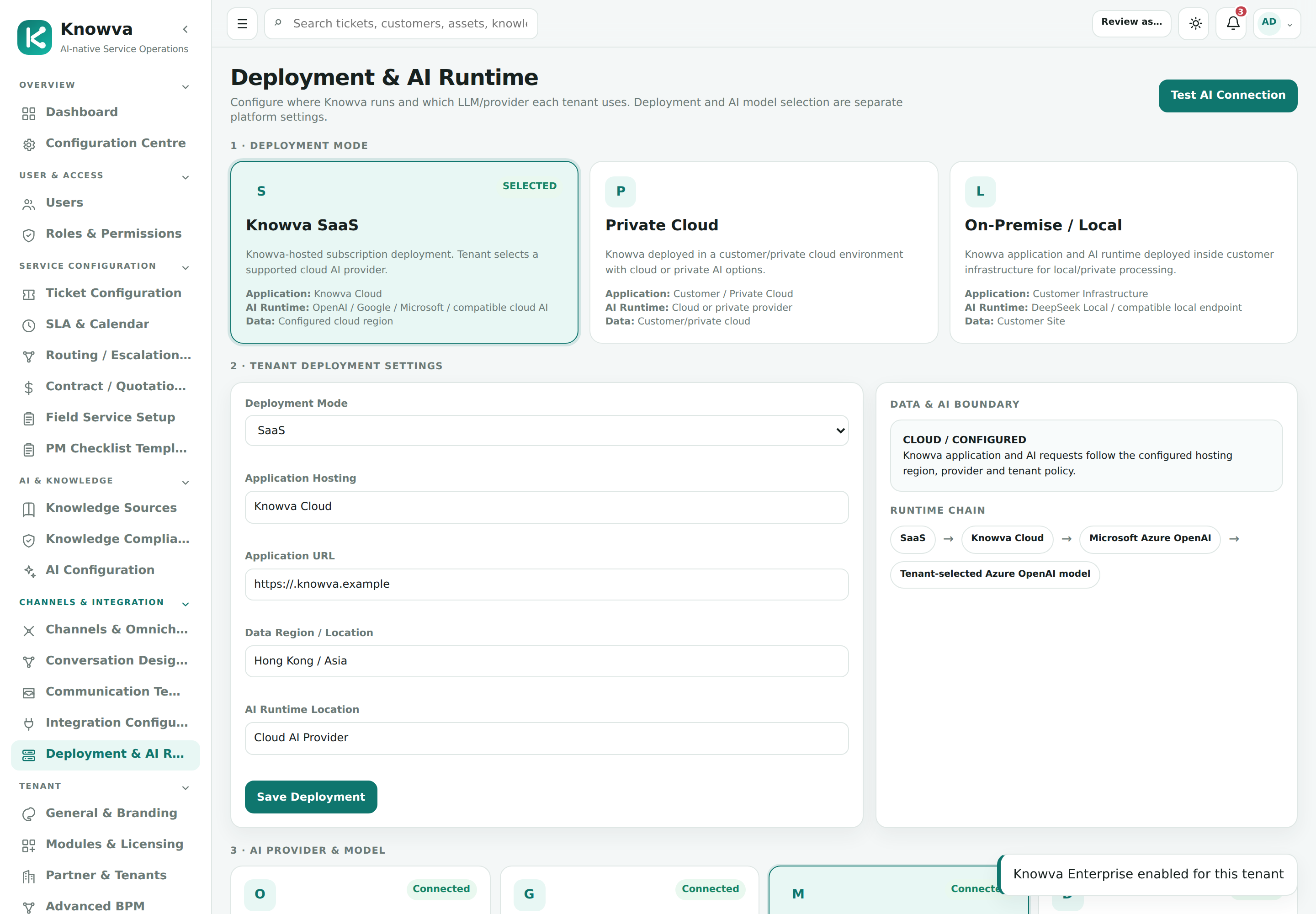
Options include OpenAI / GPT, Google Gemini, Microsoft Azure OpenAI and a supported DeepSeek local model. Knowva deployment and AI model location are chosen separately.

Explore the knowledge engine and AI configuration

Company knowledge connected to the AI

Some questions need information from several related documents. We can assess graph-based knowledge retrieval (GraphRAG) for that need as optional technical work; it is not included as a standard feature.

OpenAI / GPTGoogle GeminiMicrosoft Azure OpenAIDeepSeek Local

Running Knowva on your own servers does not automatically keep the AI processing there. You can choose a cloud AI service or a supported local model. The proposal states where processing happens, the equipment needed and any model usage fees.

Knowva deployment and AI runtime configuration with cloud and local choices
Product interface · sample data

AI configuration, with sample settings.

Enterprise knowledge controls are shown here. Your proposal lists the controls included in your edition and the agreed AI answer and staff-review rules.

Functions that fit your work

Compare the functions
against your everyday needs.

Standard provides the core service foundation. Professional adds extended service workflows; Enterprise adds advanced channels, knowledge and AI options. Extended functions are included according to released scope and configuration.

Your work Functions Everyday value Edition / availability
Recurring enquiries Voice/telephone-menu intake, customer context and staff-created cases Keep an enquiry with its customer and next action Standard foundation
Answer with company knowledge Approved published references and configured AI assistance Reduce repeated searching and explanation Standard · configured knowledge
Track service follow-up Case status, assignment, priority and response/resolution targets See responsibility and outstanding work Standard foundation
Use familiar channels and language Interactive WhatsApp, WeChat and email, plus Cantonese conversational voice AI Support customers through the enabled channel Enterprise interactive channels and Cantonese AI · configured connections
Set AI-to-person handover Handover conditions, office hours and an after-hours channel or case-number route Give customers a clear next step when more help is needed Configured service flow · edition and included scope confirmed in your solution
Coordinate after-sales work Contract/warranty checks, quotations, dispatch and service jobs Connect the customer request to the service work Professional / Enterprise extended workflows
View the detailed function comparison
Your work Functions Everyday value Edition / availability
Manage knowledge access and AI use Source reading rights, AI eligibility, review and publishing Keep company knowledge maintained and controlled Enterprise knowledge options
Keep customer and asset history Customer/company records, product/asset details and service history Keep relevant context with the case Standard foundation
Notify people of progress Outgoing email notifications and message templates Use consistent progress messages Standard · outgoing email; interactive email is separate
Route work and approvals Routing, escalation and configured approval rules Keep responsibility and decisions clear Professional / Enterprise extended workflows
Arrange internal or vendor visits Dispatch calendar, resource eligibility and vendor completion evidence Connect office coordination and field service Professional / Enterprise extended workflows
Record completed service Job sheets, parts usage, customer acknowledgement and billing readiness Retain evidence for review and follow-up Professional / Enterprise extended workflows
Maintain knowledge internally Document, note and Q&A ingestion with review and publication Update company knowledge without retraining the model Enterprise knowledge options
Review workload and service performance Operational dashboards, service reports and permitted exports See workload and cases requiring attention Core reports; extended datasets depend on available functions
Adapt a report for the team Template-based custom reports with internal sharing and exports Reuse a suitable report layout Additional module · separately scoped
Control users and records Role permissions and audit history Trace who may act and what was changed Standard foundation
Choose the AI and hosting setup Selectable provider options, cloud/local deployment and optional local AI Fit information handling to your IT arrangements Configured options; GraphRAG assessed separately

The quotation lists the functions available for your solution, enabled channels, optional work and rollout timing.

Follow one piece of work

From a question to the next action.

See what happens at each step. The included functions are listed in your proposal.

Explore the steps in detail
Step 01

Use approved knowledge

Review the company information and representative questions that the AI should support.

1 / 4
Confirm the right available solution

Know what is included
before you decide.

Compare Standard, Professional and Enterprise against the work you need to handle. The available functions and rollout timing are stated in your solution.

What is included in your solution

Standard includes configured approved knowledge, voice/telephone-menu intake, staff-created cases and outgoing email notifications. Interactive WhatsApp, WeChat and email, plus Cantonese conversational voice AI are Enterprise options. Extended service workflows and knowledge administration follow the available edition and released scope.

Fit your operating environment

Choose where the system runs.
Plan for service interruptions.

Choose cloud hosting or your own servers, then decide whether you need high availability to reduce service interruptions. We assess your IT environment, data needs and budget with you.

Where the system runs

Cloud

Run the system in a cloud hosting environment, with access and support responsibilities agreed in your proposal.

Your own servers / on-premise

Run the system on your own servers, with equipment, access and support fitted to your IT arrangements.

Protection against service interruptions

Standard · non-HA

A standard setup, without a high-availability failover arrangement. Backup and recovery are agreed for your needs.

High availability · HA

High availability (HA) reduces disruption if a system component fails. Your proposal states how the system switches to a backup component and how service is restored.

Your proposal lists the system setup, backup and recovery, required equipment, licences, hosting, maintenance and related fees.

Review deployment and commercial options
A consultant helps you find the fit

Start with the way
your team works.

Your team already has a way of getting things done. We look at who does the task, where checking is needed and what the next person needs to know, then show the product in that context.

We understand that introducing software affects people, habits and daily service. We start with how your team works, then show you the product using that workflow.

A Hong Kong company with local support, from implementation to everyday use.

Established in Hong Kong in 2005, with team qualifications in project management and IT audit.

See our team credentials
01

Show us one real workflow

Meet a product and implementation consultant for a free initial discussion and a relevant product walkthrough.

02

Agree the solution and quote

Confirm the available product, deployment, scope, fees, payment stages and rollout plan before committing.

03

Prepare the team and go live

After the agreed initial payment, we collect requirements, configure the agreed scope, train users and support testing and go-live.

Book a free consultation

Bring one process you would like to make easier.

Fees and implementation

Clear scope.
A quote for your needs.

Choose annual subscription or a one-off on-premise software licence, plus implementation. Your quotation lists the included work, optional customisation, go-live plan and payment stages.

See implementation, fees and billing start

Before you decide

How does Knowva help reduce support workload?

Approved company knowledge gives staff a maintained reference for recurring questions. Cases keep the customer background, responsible person and progress together. AI and channel options are configured around the work your team needs to handle.

Can customers use Cantonese, WhatsApp, WeChat and email?

Cantonese conversational voice AI and interactive WhatsApp, WeChat and email are Enterprise options, enabled with the required connections and available functions. Standard includes voice/telephone-menu intake and outgoing email notifications. The function comparison distinguishes these arrangements.

Can our team maintain its own knowledge?

Enterprise knowledge administration lets authorised staff add, review and publish documents and answers, with separate staff-access and AI-use rules. This updates the knowledge available to the system; it does not retrain the language model.

What does after-sales service management cover?

Core cases track responsibility, progress and service targets. Extended Professional/Enterprise workflows cover contracts and warranty, quotations, service coordination, field jobs, parts and billing preparation. Your solution lists the included functions and implementation schedule.

How are fees and ongoing support arranged?

Choose annual subscription plus one-off implementation, or a one-off on-premise licence plus implementation and annual maintenance. Subscription-period maintenance and support are explained under SMERP Care. First-year on-premise maintenance and customisation are optional.

Can we set when AI transfers a customer to a person?

Yes. Set the transfer conditions, office hours and after-hours route for your service flow. For example, after two answers that do not satisfy the customer, transfer to a person during office hours. Outside office hours, offer WeChat, WhatsApp, email or a case number according to your settings. Two answers is an example, not a fixed rule.

Take the first step with a consultant

Bring one workflow.
See what could work better.

Book a free initial consultation. See the product using one everyday workflow and receive a one-page recommendation on product suitability and how to start.

Your follow-up is with a product and implementation consultant.

YOUR TAKEAWAY

A clear basis for your next decision

  • Where the standard product fits your work.
  • Configuration, optional customisation or integration needs.
  • Where to run the system, how to reduce interruptions and how to go live.
  • An early budget direction, timing and next step.

Detailed requirements, the functional requirements document and implementation are paid services. They begin after the order is confirmed and the agreed initial payment is received.